
Nations Online
All Countries in the World
Nations Online All Countries in the World | |
Home  Earth Continents
Europe Vatican City Profile World's Most Famous Landmarks III: Places of Power and Worship Satellite View of Basilica of Saint Peter (45-degree view available) Famous Landmarks I: Most Famous Monuments Famous Landmarks II: City Icons Famous Landmarks III: Places of Power and Worship Famous Landmarks IV: Sacred MountainsMap Index Earth Continents
Europe Vatican City Profile World's Most Famous Landmarks III: Places of Power and Worship Satellite View of Basilica of Saint Peter (45-degree view available) Famous Landmarks I: Most Famous Monuments Famous Landmarks II: City Icons Famous Landmarks III: Places of Power and Worship Famous Landmarks IV: Sacred MountainsMap Index |
___ Satellite View of Basilica of Saint Peter, Vatican City (Holy See) |
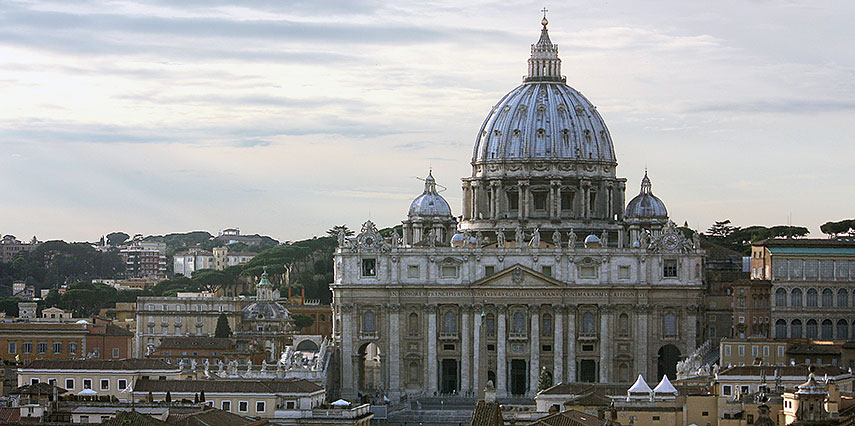 St. Peter's Basilica in 2015, seen from Castel Sant'Angelo, Rome. Image: Dguendel |
About the Basilica of Saint Peter This page is about the Saint Peter, a 500 year old Basilica, the largest religious building in the world and the Center of Christianity since the foundation of the first monumental cathedral of Saint Peter by Constantine in the 4th century.
The Basilica of Saint Peter (Latin: Basilica Sancti Petri, Italian: Basilica di San Pietro) is the most prominent building inside Vatican City, a main pilgrimage center and the most visited basilica in the World. The Basilica of Saint Peter, is in Catholic tradition the burial site of Saint Peter (Latin: Simon Petrus, English: Simon Peter), first among the twelve apostles, ordained by Jesus in the "Rock of My Church" dialogue. Simon Petrus was, in Catholics believe, the first Bishop of Rome. Apostle Peter was crucified in Rome under Emperor Nero Augustus Caesar. Also according to beliefs Saint Peter's tomb is below the altar of the basilica. Constantine's Basilica of Saint Peter 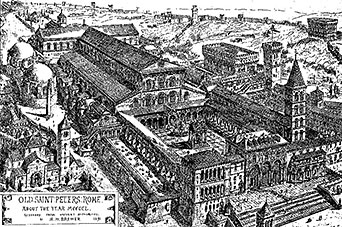 Drawing and graphic reconstruction of the Constantine basilica in the mid 15th century. Because the precise location of Peter's burial was so firmly fixed in the belief of the Christians of Rome, the church to house the basilica had to be erected on exactly that spot, near the historical site of the Circus of Nero. To achieve this, the slope of the Vatican Hill had to be excavated, even though the church could much more easily have been built on level ground slightly to the south. It took about 30 years to complete the first St. Peter's Basilica (now known as the Old St. Peter's Basilica). Over the next twelve centuries, the church gradually became the focal point of Christian belief and the center of political power of the Pope. Papal coronations were held at the basilica, Charlemagne (Charles the Great) was crowned there emperor of the Holy Roman Empire by Pope Leo III in 800. By the 15th century the church was falling into ruin. 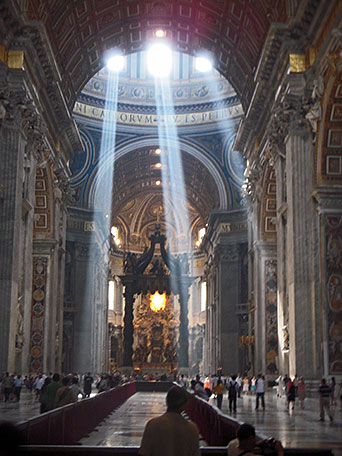 Rays of sunlight within Saint Peter's Basilica, the rays apparent convergence is a perspective effect. Image: Jraytram The building of St. Peter's Basilica is associated with the big names of artists and architects of that time: Bramante, Raphael, Michelangelo, Maderno and Bernini. Construction on the present basilica began on 18 April 1506 and was completed in 1626. Time for completion 120 years. With the beginning of the 16th century, Emperor-pope Julius II decided to demolished the old St. Peter's Basilica, which had stood for more than 1,100 years. Maybe it was also the Zeitgeist that influenced this decision. The Renaissance was in full swing, a period for the rediscovery of classical ideals and ideas on one hand, and the assurance of a new era, a mood of new beginnings. Columbus had just discovered the New World and Copernicus was about to discover the Solar System. In 1503, Julius II commissioned Donato Bramante, an Italian architect, who introduced Renaissance architecture to Milan and the High Renaissance style to Rome, with the the complete rebuilding of St Peter's Basilica. Bramante designed the floor plan of the new basilica in form of a Greek cross, with a central dome surrounded by four lower domes. 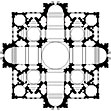 Bramante's disegno proporzionale of Saint Peter, based on a Greek cross. In January 1547, Michelangelo became Capomaestro, the master mason for a massive sanctuary under construction, until then never built before. Zoom out to see Vatican City. The Vatican City compound is situated just north of the former location of the ancient Circus of Nero. Vatican City is surrounded by the City of Rome, Italy's capital city. |
||||||
|
φ Latitude, λ Longitude (of Map center; move the map to see coordinates): , |
||||||
Google Earth: Searchable map/satellite view of Basilica of Saint Peter, Vatican City. Explore 3D model of the Basilica of Saint Peter in Google Earth Explore 3D model of the Basilica of Saint Peter in Google Earth(Make sure 3D Buildings is checked in the Layers panel in Google Earth, eventually uncheck the Terrain layer.) |
Bookmark/share this page
|
|||||
| previous landmark: Temple Mount or the Noble Sanctuary, Jerusalem | next landmark: Moscow Kremlin |
|||||
| More about Vatican City and Italy: Landmarks in Italy: The Colosseum Leaning Tower of Pisa Mount Vesuvius, Pompeii and HerculaneumCities: Searchable Map of Rome, ItalyVatican City: Map of Vatican City State Searchable map/satellite view of Vatican City Vatican City State ProfileItaly: Searchable map and satellite view of Italy Political map of Italy Italy Country ProfileContinent: Map of Central and Eastern Europe Map of EuropeExternal Links: Vatican: the Holy See Official site of the Holy See. Vatican City State Official site of the Vatican City State. St Peter's Basilica.org Site provides a map and photos of buildings in the Vatican City. Vatican Museums Online A guide to the Vatican Museums. UNESCO World Heritage: Vatican City Vatican City entry at UNESCO World Heritage center. Wikipedia: St. Peter's Basilica Wikipedia entry about St. Peter's Basilica Wikipedia: Vatican City Wikipedia entry about Vatican City |
Rome Current Weather Conditions
|
Explore more:
Related Consumer Information:
|
||||
Cities in the Mediterranean Athens, Barcelona, Florence, Istanbul, Lisbon, Ljubljana, Madrid, Monaco, Milan, Naples, Rome, San Marino, Tirana, Valletta, Venice, Zagreb Alexandria, Algiers, Beirut, Benghazi, Cairo, Jerusalem, Nicosia, Tripoli, Tunis, Tel Aviv Maps of other Countries in Southern Europe Croatia Map, Cyprus Map, Greece Map, Italy Map, Macedonia Map, Montenegro Map, Portugal Map, Serbia Map, Slovenia Map, Spain Map, Turkey Map Searchable Maps of other Countries in Southern Europe Croatia, Cyprus, Greece, Italy, Macedonia, Montenegro, Portugal, Serbia, Slovenia, Spain, Turkey Profiles of other Countries in Southern Europe Croatia, Cyprus, Greece, Italy, Macedonia, Montenegro, Portugal, Serbia, Slovenia, Spain, Turkey |
||||||
Map Help [ show ] |
||||||
One World - Nations Online .:. let's care for this planet Promote that every nation assumes responsibility for our world. Nations Online Project is made to improve cross-cultural understanding and global awareness. More signal - less NOISE |
Site Map
| Information Sources | Disclaimer | Copyright © 1998-2023 :: nationsonline.org     |


